How To: AppImage
It Just Works
What is an AppImage
A open-source format for distributing software on Linux. The nature of AppImages are that they are self-contained and independent to the underlying distribution. Aiming to be a universal package format across Linux distributions similiar to Snap and Flatpak by Ubuntu and Fedora respectively.
A Linux package system that just works.
AppImages are self contained packages bundled with all the necessary dependencies thus posing a security risk. Make sure to download yours from the official Homepages of your favourite software.
How to use
Download a .AppImage package
If you already have an .AppImage file (application) you want to install you can move on to setting up the permissions and running.
If you don’t have one that wont be a problem, below is a few links to commons applications you might be interested in, one is a markdown editor and note taking tool called Obsidian and the other is Heroic Game Launcher, an opensource game launcher for Linux that supports various windows only (Epic, GOG and Amazon Prime Games) game launchers.

Verify the integrity of your downloads:
Once we have downloaded our AppImage applications, we want to verify the integrity of the downloads by using the available sha265sum they provide.
Obsidian - Obsidian-1.11.5.AppImage:
sha256sum: d09ce116991f525658983c1cfd468f60ee8e3269d0b91dddd81e51216103f2c6

Heroic Game Launcher - Heroic-2.18.1-linux-x86_64.AppImage:
sha256sum: d405ca3a029d51d3b478fca5fda05eeb60908dcd6e9e11bd2f17161c173f1240

These are the latest releases as of the release of this post, be sure to have a look at the update date above. Downloading the latest version from the official website or Github Release page is always recommended.
If you find any of the software above useful and want to show the developers some ❤️, you might consider giving them a ⭐ on Github or perhaps fuel their next update by buying them a ☕, even better would be something a little stronger 🍺 by becoming a Patron on Patreon.
Permissions
Once our integrity checks are done, we can simply add execution permissions to our AppImage application, using the command chmod:
1
chmod +x Obsidian-1.11.5.AppImage

Running a .AppImage package
We are now ready to run our software. Execute the AppImage file:
1
./Obsidian-1.11.5.AppImage
That’s it.
A little manual labor.
What I like to do:
A little more work but it makes my life easier.
Desktop Integration
First things first, where to store your AppImage files, there are two directory locations you can try $HOME/.local/share/appimages or perhaps in your $HOME using $HOME/Applications.
A demonstration below.
Obsidian:  Heroic:
Extract:
Next we want to extract everything from the AppImage file by running it with the --appimage-extract option. This will extract and copy the content to a squashfs-root directory.
1
./Heroic-2.18.1-linux-x86_64.AppImage --appimage-extract

Rename:
We then rename the directory to something more memorable. The name of the application is more that suitable and is important for the next step.

1
mv squashfs-root/ Heroic
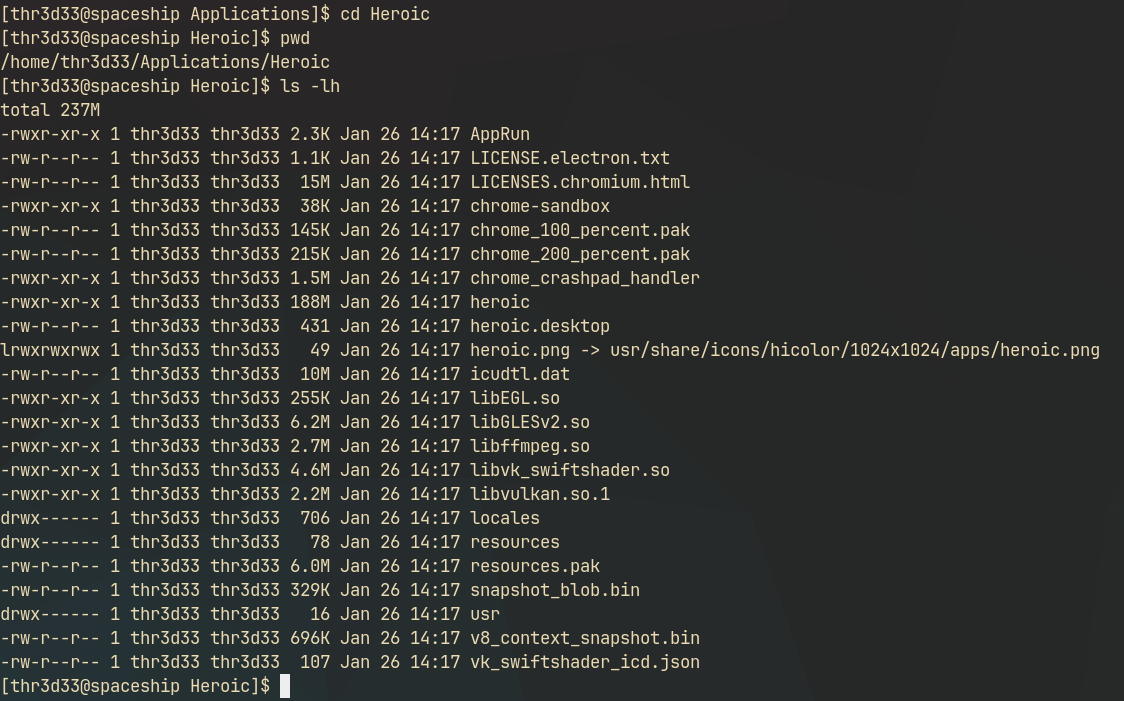
cd into the newly named application directory.
1
cd Heroic
Copy:
There are a few files that are important to us for this How-To, those are the .desktop and .png files in this case heroic.desktop and heroic.png and then the AppRun and Heroic files, the latter are executable scripts which we will get to in a moment.
We want to copy our heroic.desktop file to the .local/share/applications directory so that the system can pick up our AppImage’s in their respective GUI application launchers.
1
2
3
4
cd $HOME/.local/share/applications
# cd ~/.local/share/appimages/
cp $HOME/Applications/Heroic/heroic.desktop .
# cp $HOME/.local/share/appimages/Heroic/heroic.desktop .
Once we have our .desktop file in place. We edit the file using our favourite text-editor or IDE and change a few parameters. Namely Exec= and Icon=, we add the location of your application directory in the below example that would be $HOME/Applications/Heroic.
1
2
3
4
5
6
7
8
9
10
11
12
13
14
[Desktop Entry]
Name=Heroic Games Launcher
Exec=$HOME/Applications/Heroic/heroic --no-sandbox %U # Add fullpath (/home/$USER/)if the script is not picked up. You may need to specify your username /home/<USER>/
# Exec=$HOME/Applications/Heroic/AppRun --no-sandbox %U ## If the above doesn't work, you can try the Apprun script.
Terminal=false
Type=Application
Icon=$HOME/Applications/Heroic/heroic.png # By default the .png is not present, in my experience it is better to add it. Test what works for you.
StartupWMClass=Heroic
X-AppImage-Version=2.18.1
Comment[de]=Ein OSS-Spielelauncher für GOG, Epic Games und Amazon Games
Comment[pl]=Otwartoźródłowy launcher dla GOG, Epic Games i Amazon Games
Comment=An Open Source Launcher for GOG, Epic Games and Amazon Games
MimeType=x-scheme-handler/heroic;
Categories=Game;
Some issues I have experienced when using this method.
- In most AppImages I have downloaded there have always been one
AppRunand on<APPLICATION_NAME>script, some desktop entries will only work with one or the other.- I usually have to specify the
.pngat the end of the icon path otherwise it doesn’t work but that may be my system.- Using environment variable usually don’t work when I use them. 😇, so you might need to specify the full path i.e.
/home/<YOUR_USER>/Applications/Heroic/<FILE>. Experience may vary, please be sure to test what works on your environment.
When you are done with the edit, you can save and close. We are done. Once pointing to the run script and icon your application launcher should pick them up automatically.
My application launcher (I use Wofi):
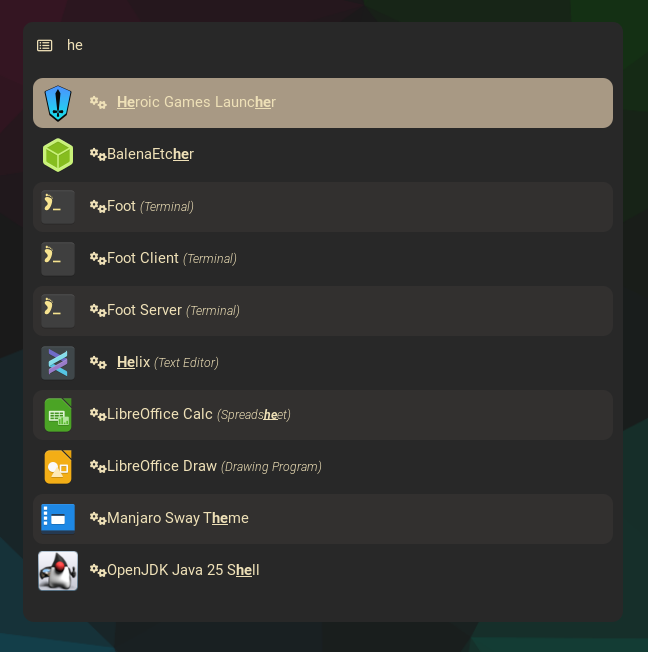
Some people even suggest pointing the Exec= path to the .AppImage file itself. I don’t usually do this. If your application is visible with the correct icon, you are good to go. You can delete the .AppImage file now.
1
rm -i Heroic-2.18.1-linux-x86_64.AppImage
Enjoy your newly installed AppImage application complete with desktop integration.
References:
- https://appimage.org/ - Homepage for the AppImage website.
- https://obsidian.md/ - Homepage for the Obsidian Editor.
- https://github.com/obsidianmd - Github page for Obsidian
- https://heroicgameslauncher.com/ - Homepage for Heroic Game Launcher.
- https://github.com/Heroic-Games-Launcher/HeroicGamesLauncher - Github home for Heroic
- https://superuser.com/questions/1306621/install-AppImage-under-arch-linux - SuperUser discussing how best to manage appimage file on Arch Linux.